Languages
Ingot supports every major programming language. Highlighting comes with Ingot, full language support (code completion, go to definition and errors) installs the first time you open a file in that language, and Run Current File runs the file with the runtime on your computer.
Three layers
- Highlighting is bundled. Java, C/C++, C#, Python, Go, Rust, Ruby, Swift, Dart, PHP, TypeScript/JavaScript and about 30 more languages are highlighted as soon as you install Ingot. Nothing downloads.
- Full language support installs on first use. The first time you open a C++ file, Ingot asks once: Get full C++ support (code completion, go to definition, errors)? with Install and Not Now. Install gets the open language server from Open VSX. The same happens for C#, Python, Go, Rust, Kotlin, Ruby, Dart, Swift, Scala, GraphQL, Protocol Buffers and TOML. Java and TypeScript/JavaScript come fully ready.
- Runtimes and toolchains are yours. To run or build code, Ingot uses the JDK, compilers and SDKs on your computer. Settings › Languages & Frameworks shows which ones it found.
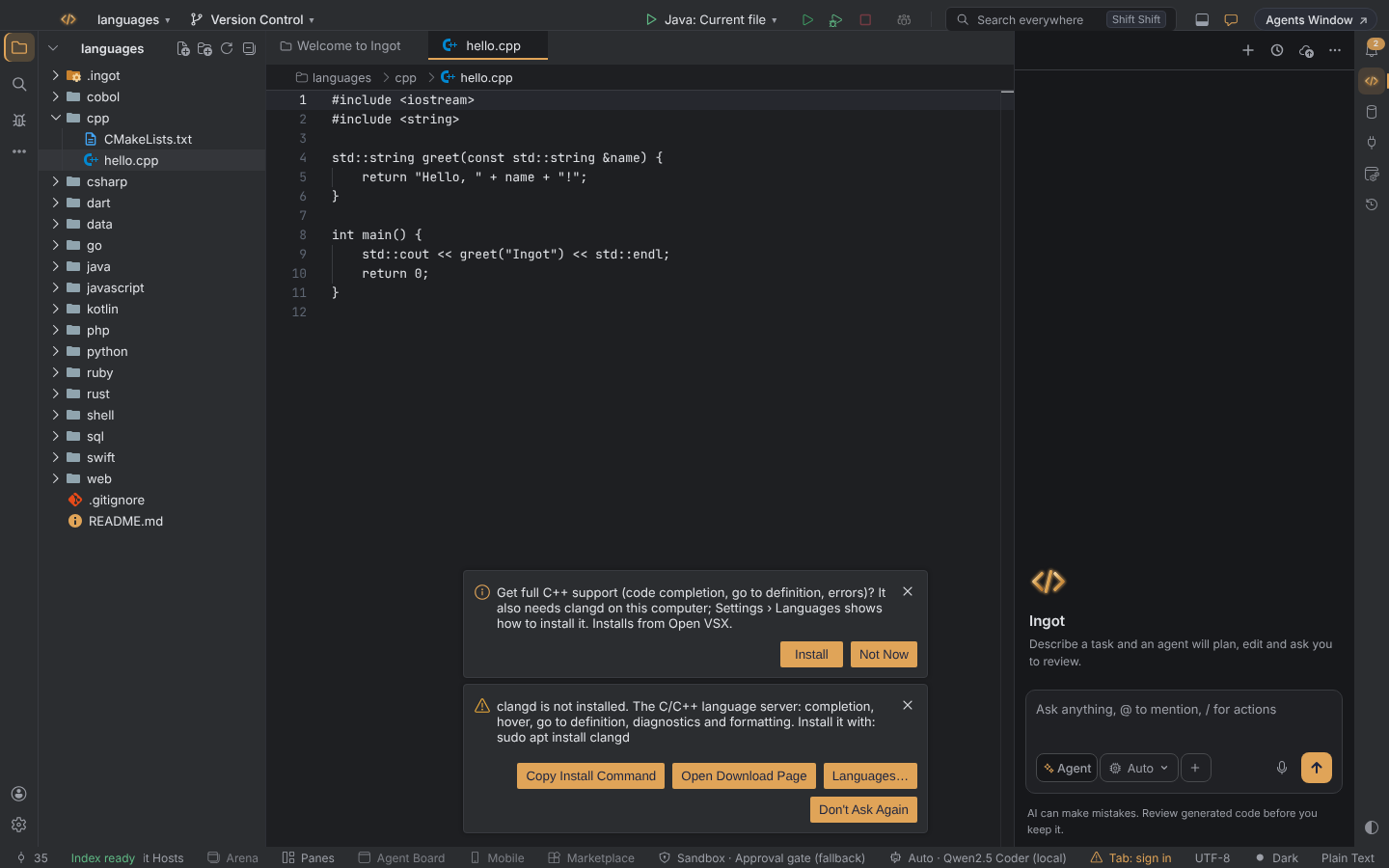
Some language servers also need a program on your computer, for example clangd for C and C++. Ingot says so in a second notice, with Copy Install Command for your system, Open Download Page and Languages…, which opens Settings › Languages & Frameworks.
Every language
| Language | Highlighting bundled? | IntelliSense (completion, definition, errors) | Runtime needed to run |
|---|---|---|---|
| Java | Yes | Bundled (Language Support for Java, with its own Java runtime) | JDK to run; editing works without one |
| C / C++ | Yes | On first use: clangd extension (and clangd on PATH) | clang or gcc |
| C# | Yes | On first use: open C# extension (OmniSharp-based) | .NET SDK |
| Python | Yes | On first use: Python and basedpyright | Python 3 |
| Go | Yes | On first use: Go extension (installs gopls) | Go |
| Rust | Yes | On first use: rust-analyzer | Rust (cargo) |
| TypeScript / JavaScript | Yes | Bundled | Node.js |
| PHP | Yes | Bundled basics; Phpactor for project symbols | PHP 8.1 or later |
| Ruby | Yes | On first use: Ruby LSP | Ruby 3 or later |
| Kotlin | With the extension | On first use: Kotlin extension (brings highlighting) | Kotlin compiler and a JDK |
| Swift | Yes | On first use: Swift extension (sourcekit-lsp) | Swift toolchain |
| Dart / Flutter | Yes | On first use: Dart (and Flutter, optional) | Dart SDK / Flutter SDK |
| Scala | With the extension | On first use: Scala syntax and Metals | Java runtime |
| GraphQL, Protocol Buffers, TOML | With the extension | On first use | none |
| SQL | Yes | Formatter only | SQLite to run |
| Shell | Yes | Bash IDE (optional) | Bash |
| HTML, CSS, SCSS, Less, JSON, YAML, Markdown | Yes | Bundled | none |
| Lua, R, Perl, PowerShell, Makefile, Groovy, Clojure, F#, Objective-C, Julia, LaTeX, XML, INI, Batch, Diff, Log, Visual Basic, Razor, CoffeeScript, Handlebars, Pug, HLSL, ShaderLab, reStructuredText, Dockerfile | Yes | Install an extension from Settings › Plugins if you want one | their own |
Settings › Languages & Frameworks
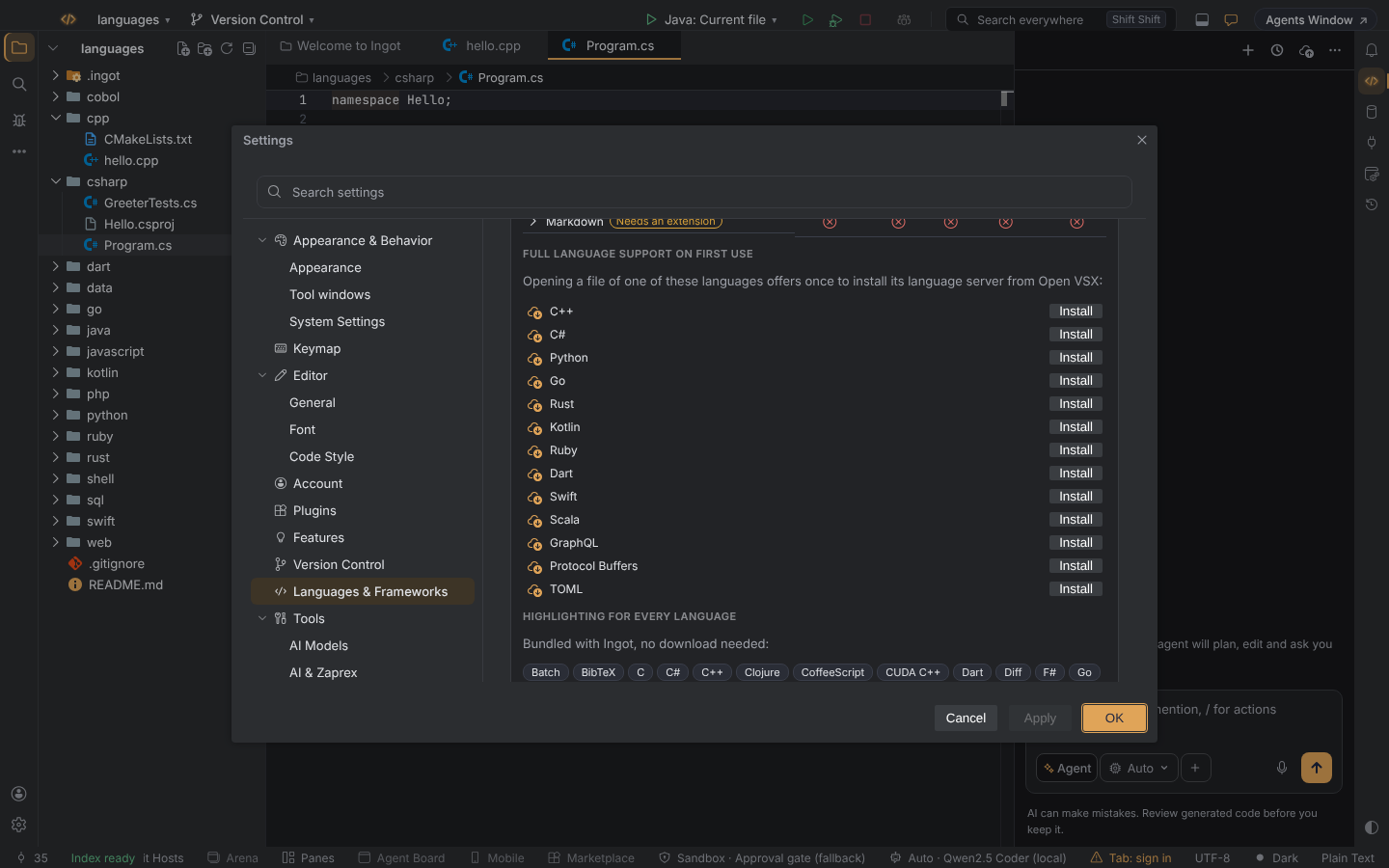
Settings › Languages & Frameworks has everything about languages in one place:
- The languages table: one row per language with what works now (highlighting, completion, hover, go to definition, diagnostics and more). Click a row, or focus it and press Enter, for the extensions each feature comes from and the toolchains that are missing.
- Full language support on first use: the languages Ingot offers to set up, each with Install, so you can install one before you open a file.
- Highlighting for every language: the languages bundled with Ingot.
- Toolchains: the JDK, clang/gcc, .NET SDK, Python, Go, Rust/cargo, Node.js, Ruby, Dart, Flutter, Swift, Kotlin and the rest that Ingot finds on your PATH, with their versions. Each has an Install… link to its official download page and lists the languages Run Current File uses it for.
Install Language Support for Current File in Find Action installs the support for the file you have open.
The Languages & toolchains row in Ingot Health warns when the files in this project are missing a language server or a runtime.
Run Current File
Run › Run Current File (Alt+Shift+F9 in the Ingot keymap) runs the open file. It works for Java, C, C++, C#, Python, Go, Rust, TypeScript/JavaScript, Ruby, PHP, Kotlin, Swift, Dart, SQL, Shell and COBOL.
- The output goes to a terminal tab. Ctrl+C stops the run.
- If the runtime is missing, Ingot tells you how to install it instead of failing.
Other languages: install an extension
For a language that isn't in the table, or for more than highlighting, install an extension:
- From the Marketplace: search the Ingot Store and Open VSX, the open extension registry, in one list.
- From the Extensions tool window: search Open VSX.
- From a file: Install from VSIX… installs a
.vsixpackage you downloaded.
For example, for COBOL, search for "COBOL" in the Marketplace and install a COBOL extension for highlighting and editing. Run Current File then compiles and runs your COBOL file with GnuCOBOL, if it is on your PATH; Settings › Languages & Frameworks shows whether it is.
The first-use language servers always come from Open VSX. The Microsoft Marketplace is off by default and never used for them, and Ingot never offers extensions with proprietary parts. Extensions made for another editor are marked by the Extension guard.
Settings
| Setting | Default | What it does |
|---|---|---|
ingot.languages.serverOffers | true | Offer full language support (Settings › Languages & Frameworks): offer once to install a language's support when you first open one of its files |
ingot.languages.missingNotice | true | warn once when a file opens without its bundled language support (Language support) |
Desktop and browser
The desktop app and the browser edition behave the same. In the browser edition, the toolchains are the ones on the machine that runs the Ingot backend.