Context Engine
The Context Engine is the second part of the .ingot engineering OS: one task context per task, and where every piece came from. Each message you send gets one task context: the rules, files, skills, decisions, habit, memories and learnings the turn is built from, each with its source. You can see it under your message, and files that changed after the agent read them are flagged.
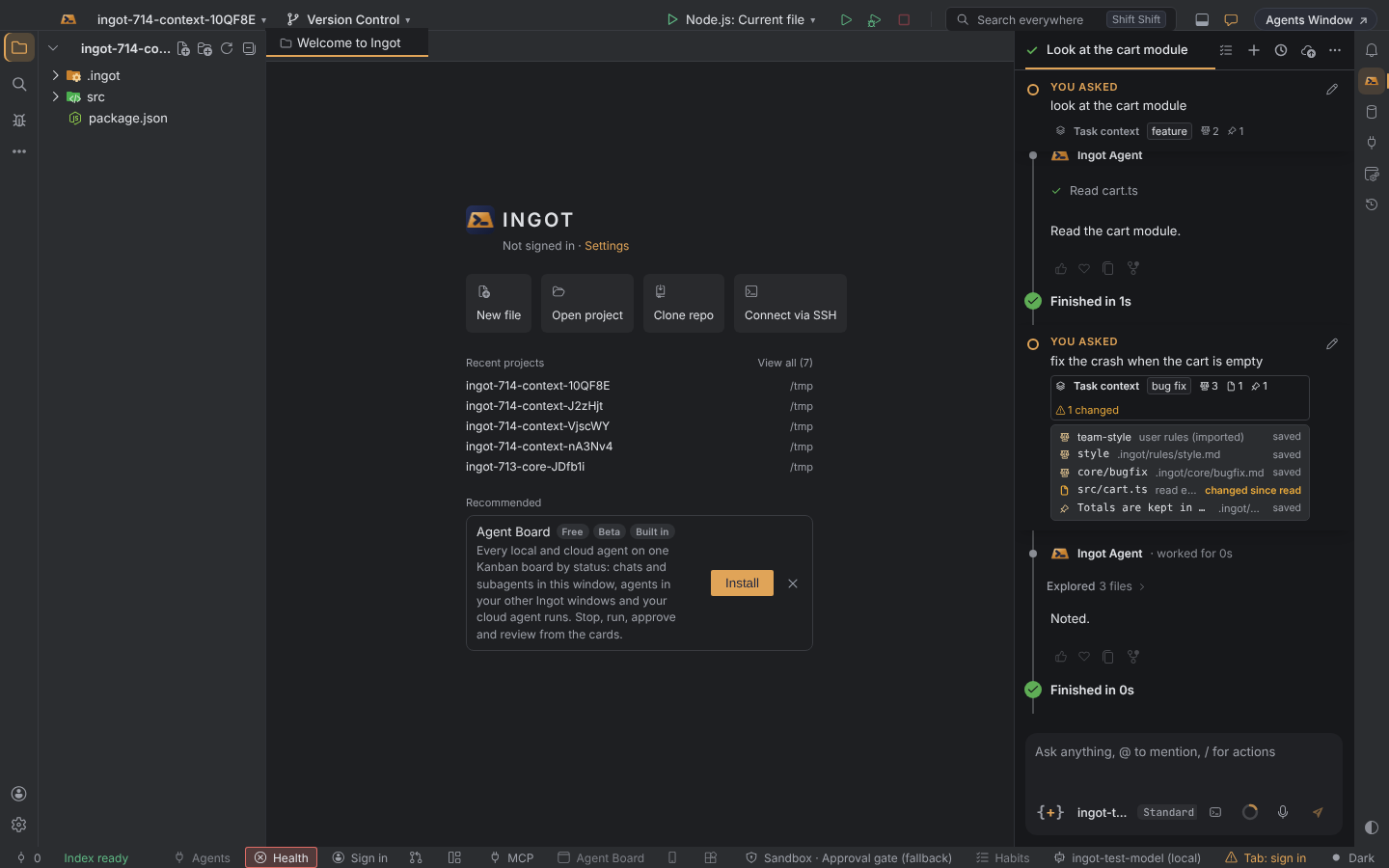
What goes into a task context
| Source | Pieces | Where it came from |
|---|---|---|
| Rules | the rules loaded for this task type (Core rules by task type) | the rule file, such as .ingot/core/bugfix.md, or user, team or existing editor rules |
| Files | files you attached, and files the agent read or edited earlier in the chat | attached, or read earlier in this chat |
| Skills | the skills offered for the files in play | the skill file |
| Decisions | locked decisions | .ingot/decisions.md |
| Habit | the active habit | its playbook in .ingot/habits |
| Memories and learnings | the memories and shared-context learnings that match | memories, shared context |
Freshness
Ingot notes when the agent read or wrote each file. If the file changes on disk after that (you edit it, a script rewrites it, you switch branches), it is marked changed since read, the summary shows 1 changed, and the agent is told to read it again before editing it. Rules, decisions and other saved records are read again every turn and show as saved.
See it in the chat
Under your message, Task context shows the task type and a count per source. Click it for the full list. Files, rules, skills and the habit open their file when you click them.
What the agent is told
A short Task context block: the task type, the count per source and the files to read again. The rules and records themselves are sent as before, so the block costs only a few tokens. Nothing extra is loaded: rules for other task types stay out, and their count is shown.
Turn it off
| Setting | Default | Where |
|---|---|---|
ingot.contextEngine.enabled | on | Settings › Context Engine, Settings › Features › Context Engine |
Off: no Task context block and no list in the chat.
See also Core rules by task type, Decision ledger and Context and memories.