Automations
Automations start an agent on a pull request, a comment, a CI failure, a Slack message, a Linear issue or comment, a webhook or a schedule, and keep it working until a goal is met.
Each automation is a Markdown file in .ingot/automations/, so it lives in your repository and is reviewed like code. It runs in the open Ingot IDE (run: local) or on an Ingot cloud agent while the IDE is closed (run: cloud).
An automation file
---
name: Fix failing CI
on: [ci_failure]
branches: [main]
run: local
goal: CI passes again
done_when: [the failing tests pass locally, no unrelated changes]
check: npm test
max_iterations: 3
---
CI failed: {{title}}.
Find the failing job, reproduce it locally, make the smallest safe fix and run the tests again.
The file name is the automation's id (fix-ci.md is fix-ci). The text after the frontmatter is the prompt. {{title}}, {{body}}, {{branch}}, {{base}}, {{url}}, {{author}}, {{number}}, {{repo}}, {{workflow}}, {{sha}} and {{channel}} are filled in from the event, and for Linear also {{identifier}} (ENG-42), {{team}}, {{state}} and {{labels}} (comma-separated). Text from outside (a PR body, a comment, a Slack message, a Linear issue) is fenced as untrusted data, so the agent never follows instructions hidden inside it.
| Key | Default | What it does |
|---|---|---|
on | required | one or more triggers (below) |
run | local | local: the open IDE starts an agent chat. cloud: an Ingot cloud agent run |
enabled | true | false keeps the file but never starts it |
repo | this project's origin | owner/name: only events from that GitHub repository |
branches | any | base branch globs for pr, head branch globs for ci_failure |
pr_actions | opened, reopened, ready_for_review | also synchronize, edited, closed |
mention | @ingot | comment needs this text; "" means any comment |
workflows | any | ci_failure: workflow or check name globs |
slack_channel, keyword | any | slack: one channel (#eng or C0123…); keyword must appear in the message (also for webhook, and for linear.* in the issue title, description or comment) |
linear_labels | any | linear.*: label name globs. The issue needs at least one matching label |
linear_teams | any | linear.*: team key globs (ENG, WEB) |
linear_states | any | linear.*: workflow state name globs (Todo, In Progress) |
cron, timezone | cron: five fields (0 3 * * *) or @daily; at least 5 minutes apart. The cloud uses UTC unless timezone is set | |
cooldown | 10 | minutes before the same automation starts again |
model | the default | the model for the agent |
Triggers
| Trigger | Starts on |
|---|---|
pr | a pull request opened, reopened or ready for review (GitHub pull_request) |
comment | a PR or issue comment, or a review comment, that mentions @ingot |
ci_failure | a failed or timed-out GitHub Actions run or check (workflow_run, check_run, check_suite) |
slack | an @Ingot mention, a /ingot slash command, or a channel message with the keyword |
webhook | a POST to the automation's webhook URL (any JSON or text) |
cron | the schedule |
linear.issue_created | a new Linear issue |
linear.issue_updated | any change to a Linear issue: state, labels, title, assignee… |
linear.comment_created | a new comment on a Linear issue |
Events sent by bots, or by Ingot itself, never start an automation, so an automation can't trigger itself in a loop. The same delivery (the same CI run, comment or PR update) starts an automation only once. See Start from Linear for the Linear triggers.
Hold a goal until it is met
With goal, the agent keeps working until the goal is met or it has used max_iterations turns (default 5, at most 20):
- The agent works on the prompt, with the goal and the
done_whencriteria in view. - Ingot runs
check(a command such asnpm test). It must exit 0. - If it fails, the agent gets the check's output and tries again.
- The fire ends as Goal met, or Gave up when the turns run out.
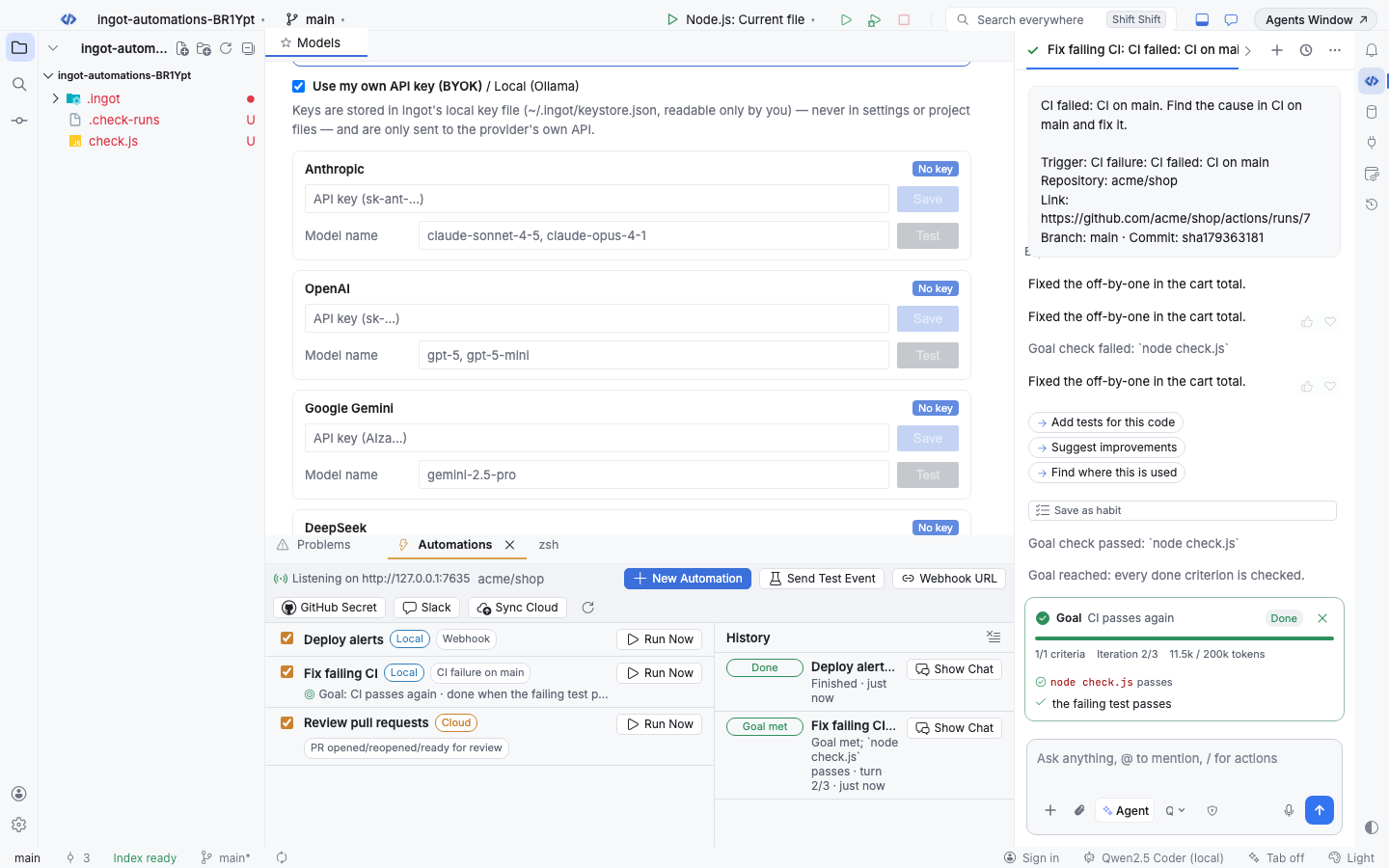
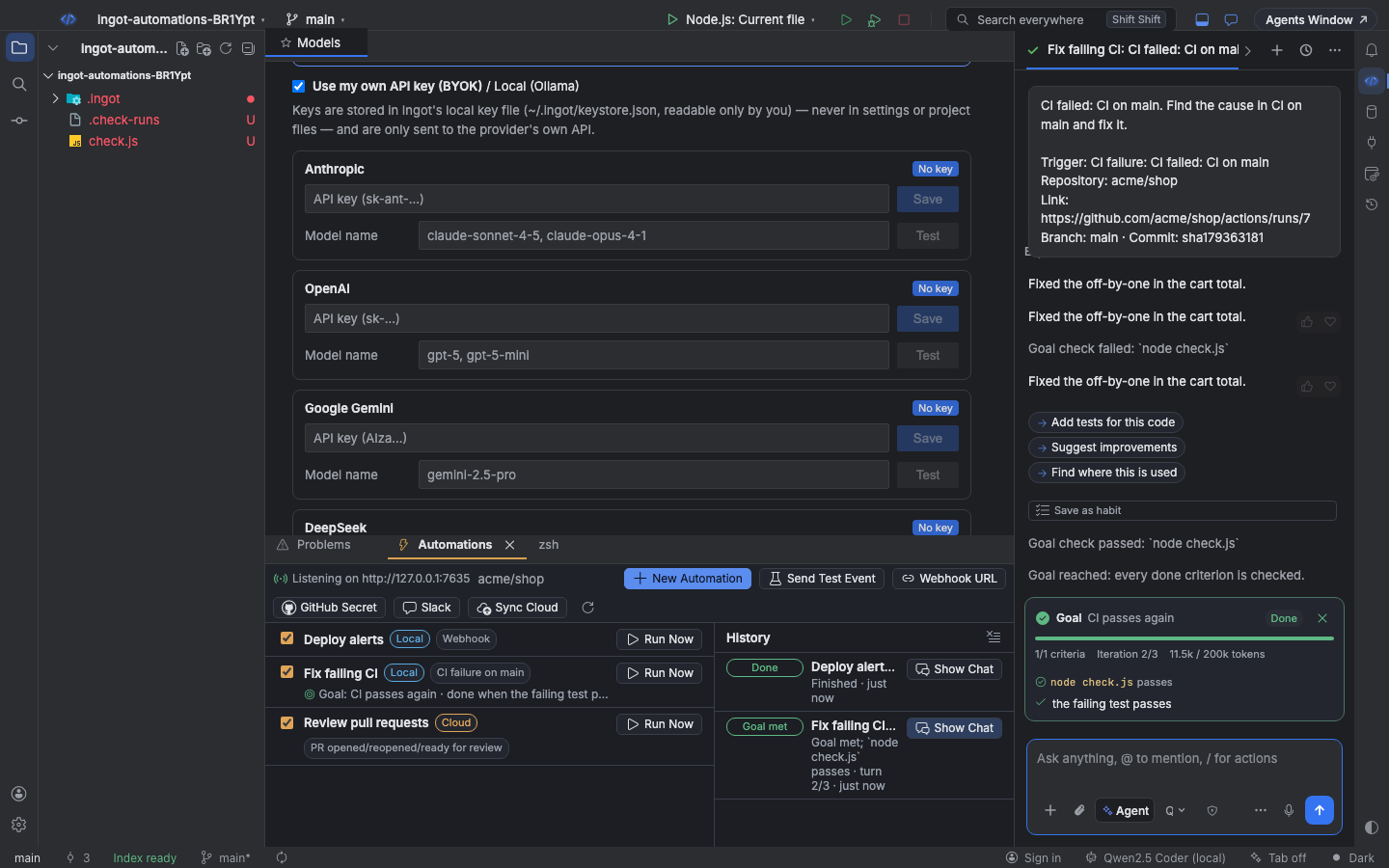
In the IDE this is the chat's goal mode: the goal banner shows each criterion, the check result and the turns used. In the cloud, every try is a new run that starts with the failing check's output.
In the IDE
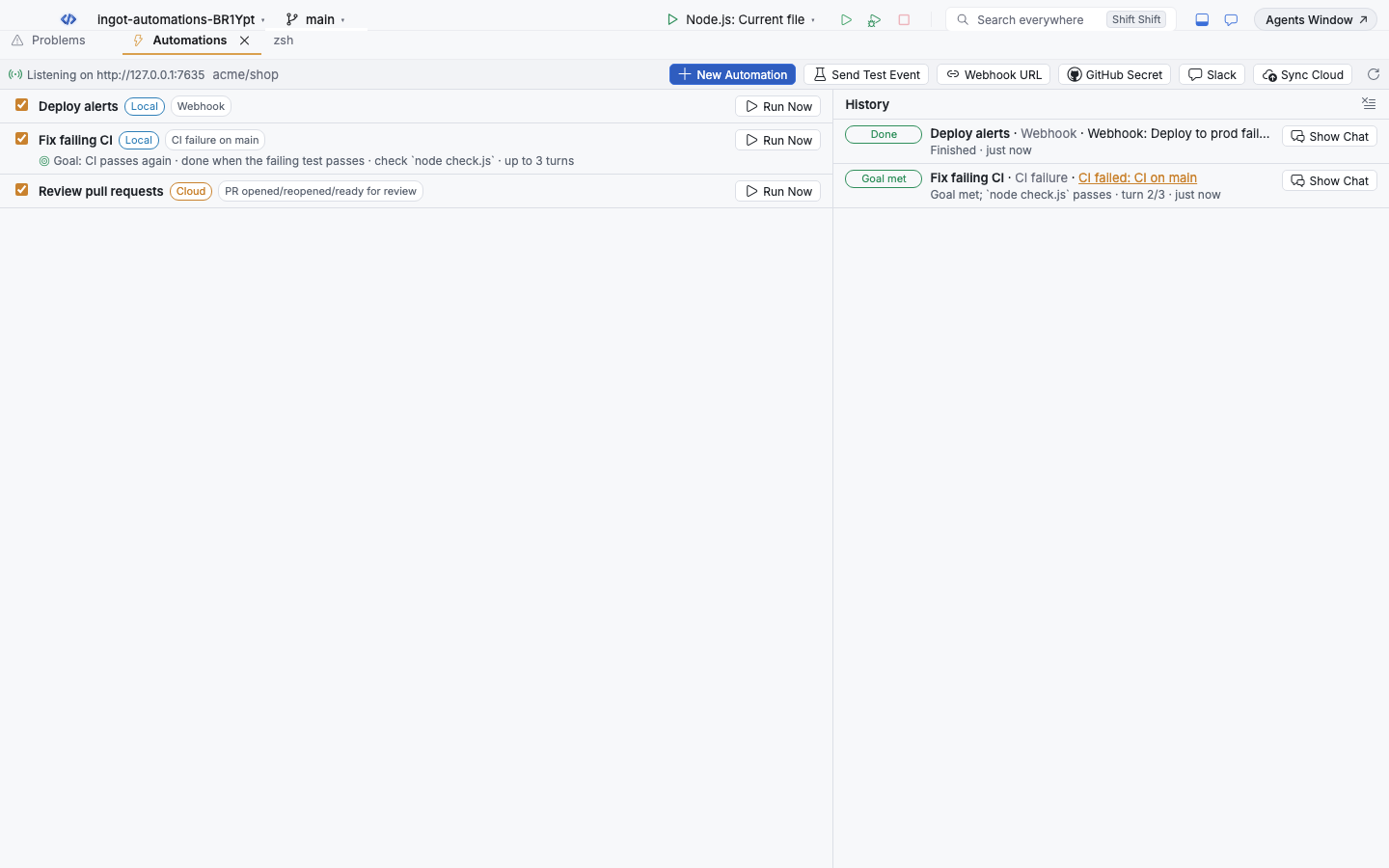
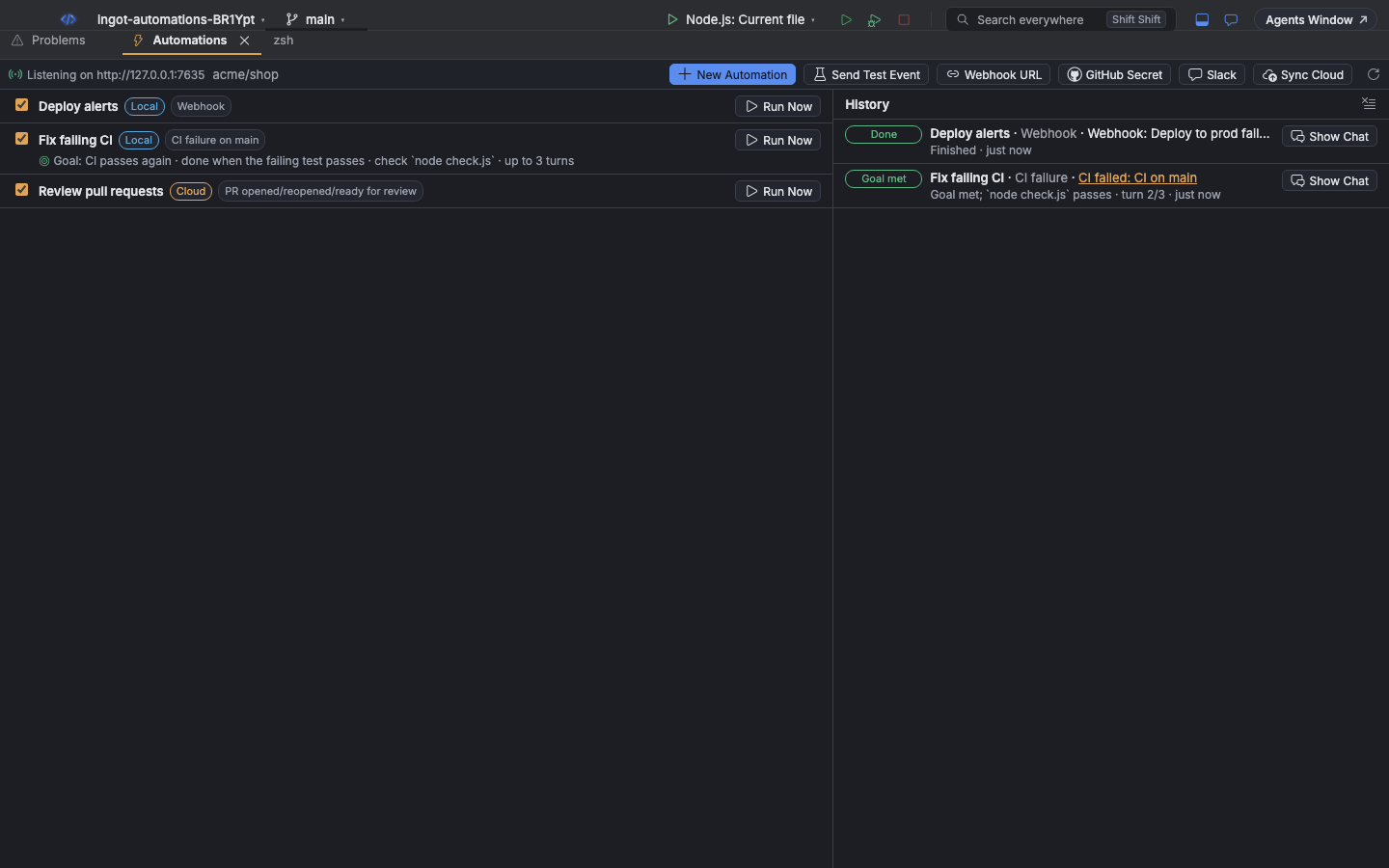
Open Automations in the bottom panel (⌥⇧N on Windows and Linux, ⌘⌥⇧N on macOS). It lists each automation with its triggers, where it runs and its goal, and the history of every fire: what started it, the turns used and the result. Show Chat opens the agent chat of a fire.
| Action | macOS | Windows / Linux |
|---|---|---|
| Automations panel | ⌘⌥⇧N | Alt+Shift+N |
| New Automation… (from a template or a blank form) | ⌘⌥⇧C | Ctrl+Alt+Shift+C |
| Run Automation Now… | ⌘⌥J | Ctrl+Alt+J |
| Send Test Event to Automations… | ⌘⌥G | Ctrl+Alt+G |
Every action is also in Find Action, with Copy Automation Webhook URL, Copy GitHub Webhook Secret for Automations, Set Slack Signing Secret for Automations, Set Linear Signing Secret for Automations, Sync Cloud Automations, Reload Automations and Clear Automation History. Settings are under Settings › Automations: the on/off switch, the local receiver and its port (7391), how many automations may run at once (2) and notifications.
GitHub, Slack and webhooks
Local automations listen on a receiver inside the IDE at http://127.0.0.1:7391:
/github: add a GitHub webhook (repository Settings › Webhooks) with content typeapplication/jsonand the secret from Copy GitHub Webhook Secret. Choose Pull requests, Issue comments, Pull request review comments, Workflow runs and Check runs./slack: the Events API request URL and slash command URL of your Slack app; set its signing secret with Set Slack Signing Secret for Automations./linear: the URL for a Linear webhook. See Start from Linear./hooks/<id>: any tool can POST here with the token in Copy Automation Webhook URL (Authorization: Bearer <token>or?token=).
GitHub and Slack can't reach 127.0.0.1 directly: forward with a tunnel (for example gh webhook forward), or use run: cloud.
Cloud automations have public URLs on the Ingot server. Sync Cloud in the panel (or ingot automations sync) uploads the run: cloud files and shows the URLs:
| Hook | URL | Signed with |
|---|---|---|
| GitHub | /api/bot/automations/hooks/<key>/github | your GitHub webhook secret (X-Hub-Signature-256) |
| Slack | /api/bot/automations/hooks/<key>/slack | your Slack app's signing secret |
| Webhook | /api/bot/automations/hooks/<key>/hooks/<id> | your webhook token |
Unsigned calls are refused. Cloud automations need a plan with Zaprex cloud agents (Silver, Gold or Platinum), and they use its minutes, approvals and limits.
Start from Linear
Three triggers start an agent from Linear: linear.issue_created, linear.issue_updated and linear.comment_created. Removed issues and edited or deleted comments are ignored. Changes made by integrations, OAuth apps or Ingot itself never start an automation.
Narrow them down with linear_labels, linear_teams, linear_states and keyword. Matching ignores case, and * and ? work like they do in branches. When you set several filters, all of them have to match.
linear.issue_updatedfires on every edit. Pair it withlinear_labelsorlinear_statesso it only runs where you want it. Thecooldownstops it from running again for the same issue too soon.- Linear doesn't always send the state or labels with a comment. A comment automation with
linear_statesorlinear_labelsthen won't match, so filter comment automations bylinear_teamsor by nothing.
The agent's prompt always includes the issue identifier, its title, its URL and the description. Comment events give the comment text, plus the issue description when Linear sends it. Text from Linear is fenced as untrusted data, like PR bodies and Slack messages. New Automation… and automations new --template linear-issue start from a Linear issue template.
Set up the Linear webhook
Linear reaches local automations (run: local) only. Cloud automations don't take Linear events yet.
- Forward the receiver through a tunnel (for example
ngrok http 7391orcloudflared tunnel --url http://127.0.0.1:7391), because Linear can't reach127.0.0.1. - In Linear, open Settings › API › Webhooks and choose New webhook. Set the URL to
<tunnel URL>/linear, pick the team (or all public teams) and the data types Issues and Comments. - Copy the webhook's Signing secret. In Ingot, click Linear in the Automations panel (or run Set Linear Signing Secret for Automations…) and paste it.
- Add an automation with a
linear.*trigger. Create or label an issue to test it, or choose Send Test Event › Linear issue created.
Ingot checks the Linear-Signature header, the HMAC-SHA256 of the raw body made with the signing secret. It refuses calls with a missing or wrong signature, and calls whose webhookTimestamp is more than five minutes old. Without a saved secret, /linear answers 503.
Example: fix bugs labeled ingot
.ingot/automations/linear-bugs.md:
---
name: Fix Linear bugs labeled ingot
description: When an ENG issue gets the ingot label, try a fix and open a PR.
on: [linear.issue_created, linear.issue_updated]
linear_teams: [ENG]
linear_labels: [ingot]
linear_states: [Todo, Backlog]
goal: the bug is fixed and covered by a test
check: npm test
max_iterations: 4
cooldown: 60
---
Work on Linear issue {{identifier}} ({{url}}): {{title}}

{{body}}

Reproduce the problem, make the smallest safe fix, add a test, and open a pull request
whose title starts with {{identifier}} so Linear links it.
Example: answer @ingot in Linear comments
---
name: Linear @ingot comments
on: [linear.comment_created]
linear_teams: [ENG]
keyword: "@ingot"
---
Someone asked for help on Linear issue {{identifier}} ({{url}}).
Do what the comment asks and summarize what changed.

{{body}}
From the terminal
npx @ingotide/cli automations                     # list: triggers, where each runs, goal, next run
npx @ingotide/cli automations validate            # check every file; exits 1 on errors (CI)
npx @ingotide/cli automations new --template fix-ci
npx @ingotide/cli automations test --github workflow_run payload.json --show-prompt
npx @ingotide/cli automations sync                # upload run: cloud automations
npx @ingotide/cli automations run fix-ci          # Run Now in the cloud
npx @ingotide/cli automations fires               # recent cloud fires and goal tries
test runs offline: it shows which automations a sample GitHub, Slack, webhook or schedule event starts, and why the others don't. The cloud commands need a personal access token (--token or INGOT_TOKEN). Every option is on CLI.
Safety
- An automation's agent has the same tools, sandbox and approvals as a chat you start yourself; a risky step still waits for your approval.
- At most 2 local automations run at once (Settings › Automations); an event that arrives while they are busy is skipped, and the sender is told why.
- Turn every automation off in Settings › Automations, or one with its checkbox in the panel (this sets
enabled: falsein the file). - Secrets live in the IDE's key store or encrypted on the server, never in the files.