Import an existing setup
Opening a project that already has rules from the editor you used before? Ingot imports them into .ingot the first time you open the project, with no question, and keeps them in sync from then on. Rules, commands, skills, MCP servers, hooks, ignore files, BUGBOT.md and environment.json all come along. The original files are never changed.
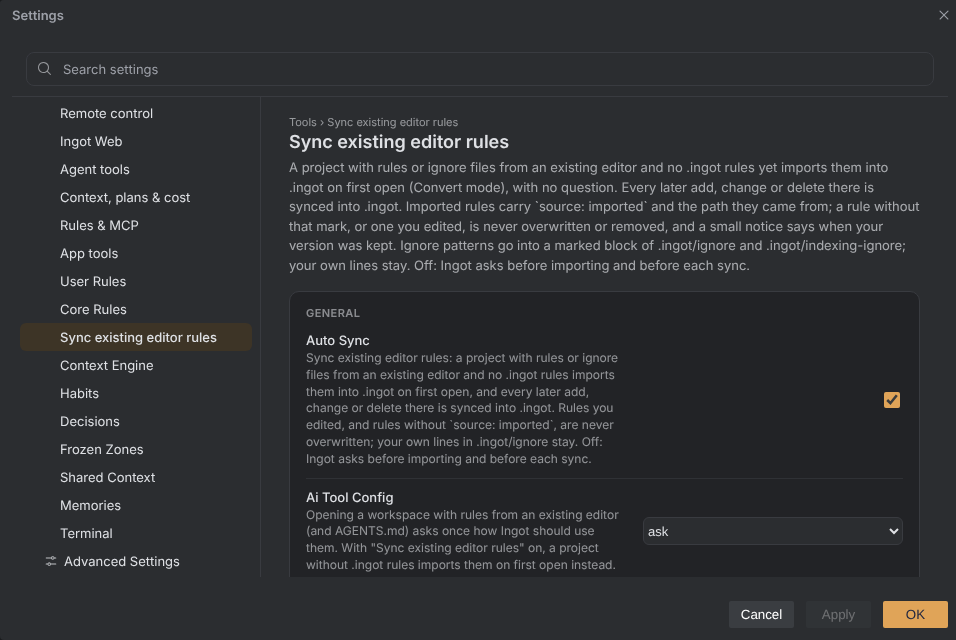
First open
When the project root has the existing editor's rules or its root ignore files, and the project has no rules in .ingot/rules or .ingot/core yet, Ingot:
- Copies and translates everything into
.ingot(Convert mode). - Marks each imported rule with two front-matter lines:
---
alwaysApply: true
source: imported
importedFrom: <path of the original rule>
---
- Puts the editor's ignore patterns into a marked block of
.ingot/ignoreand.ingot/indexing-ignore. Lines you already had stay where they are.
Nothing pops up. If the project already has its own .ingot rules, Ingot asks first (see Change your answer).
Automatic sync
While Settings › Sync existing editor rules is on (the default), every later change in the existing editor's files is synced into .ingot without asking:
| Change there | In .ingot |
|---|---|
| a rule or another file is added (any synced folder) | it is added, with the import mark |
| a rule changes | the copy is updated, unless you edited it |
| a rule is deleted | the copy is removed, unless you edited it |
| an ignore file changes | only the imported block is replaced |
| an ignore file is deleted | the imported block is removed |
Your edits always win:
- If you edited an imported rule and the original changed too, Ingot keeps your version and shows a small notice: Kept your version: .ingot/rules/style.md.
- A rule without
source: importedis yours. Ingot never overwrites or removes it. Delete the two mark lines to take a rule over. - The same goes for a file in the other synced folders (core, agents, skills, habits, knowledge, workflows, mcp-flow, commands) that you wrote yourself: a file with the same name there never replaces it.
- Ingot never writes to the existing editor's folder. Writing rules back to its format happens only when you ask.
- Lines you write in
.ingot/ignoreand.ingot/indexing-ignore, above or below the block, are never touched.
The imported block looks like this:
my-own-line/

# >>> ingot: imported from existing editor rules
# Kept in sync by Ingot. Add your own lines outside this block.
secrets/
*.pem
# <<< ingot: imported from existing editor rules
Turn the setting off and Ingot asks before importing a new project, and asks Sync the changes into .ingot? before each sync. It is also in Settings › Features › Sync existing editor rules.
What is imported
| From the existing editor | To |
|---|---|
| rules (also in subfolders) | .ingot/rules/**/*.md (keeps description, globs, alwaysApply) |
| its single legacy rules file | a rule in .ingot/rules/ (an Always rule) |
AGENTS.md (also in subfolders) | .ingot/rules/agents.md next to it (an Always rule) |
| core, agents, skills, habits, knowledge, workflows, mcp-flow, commands and hooks | the same folders under .ingot/; .mdc files become .md |
mcp.json | merged into .ingot/mcp.json (servers already there win) |
hooks.json | merged into .ingot/hooks.json (script paths point to .ingot/hooks/) |
| root ignore and indexing-ignore files | a marked block in .ingot/ignore and .ingot/indexing-ignore |
BUGBOT.md (also in subfolders) | .ingot/BUGBOT.md next to it |
environment.json | .ingot/environment.json |
- Existing files in
.ingotare never overwritten. A rule with the same name is skipped, whatever its extension or letter case. mcp.jsonandhooks.jsononly gain entries they didn't have.- Every text document (
.md,.mdc) in those folders gets the import mark, like a rule. Scripts and data files (.sh,.json, …) are copied byte for byte. - Other content, such as editor extensions, is left out.
After importing, Ingot reads only .ingot, so nothing is applied twice.
Change your answer
Run Other AI Tools: Change Import Mode… and pick:
| Choice | What happens |
|---|---|
| Convert to .ingot | copies everything into .ingot and keeps it in sync |
| Keep existing editor rules | reads the existing editor's files in place; nothing is copied |
| Do not use existing editor rules | ignores them in this project (AGENTS.md is still read) |
| Ask again next time | forgets the answer for this project |
Other AI Tools: Convert Existing Editor Rules to .ingot converts right away, and Other AI Tools: Sync Existing Editor Rules into .ingot syncs on demand. MCP servers and / commands reload at once. Answers are saved per project in your Ingot user folder, so they apply in every window.
To never import or be asked, set "ingot.import.aiToolConfig": "never" in your user settings.json; projects then keep reading the existing editor's files in place.
Related pages
| Topic | Page |
|---|---|
rule types, @file references | Rules |
.ingot/ignore and .ingot/indexing-ignore | Ignore files |
/ commands from every folder | Slash commands |
mcp.json variables and envFile | MCP |
| hook events and output | Hooks |
environment.json | Project environment |