Changes side panel
Your changed files can live in the Commit panel above the commit message (the default) or in their own Changes view in the left side bar. Pick one with ingot.git.changesLocation; the switch applies at once, without a reload.
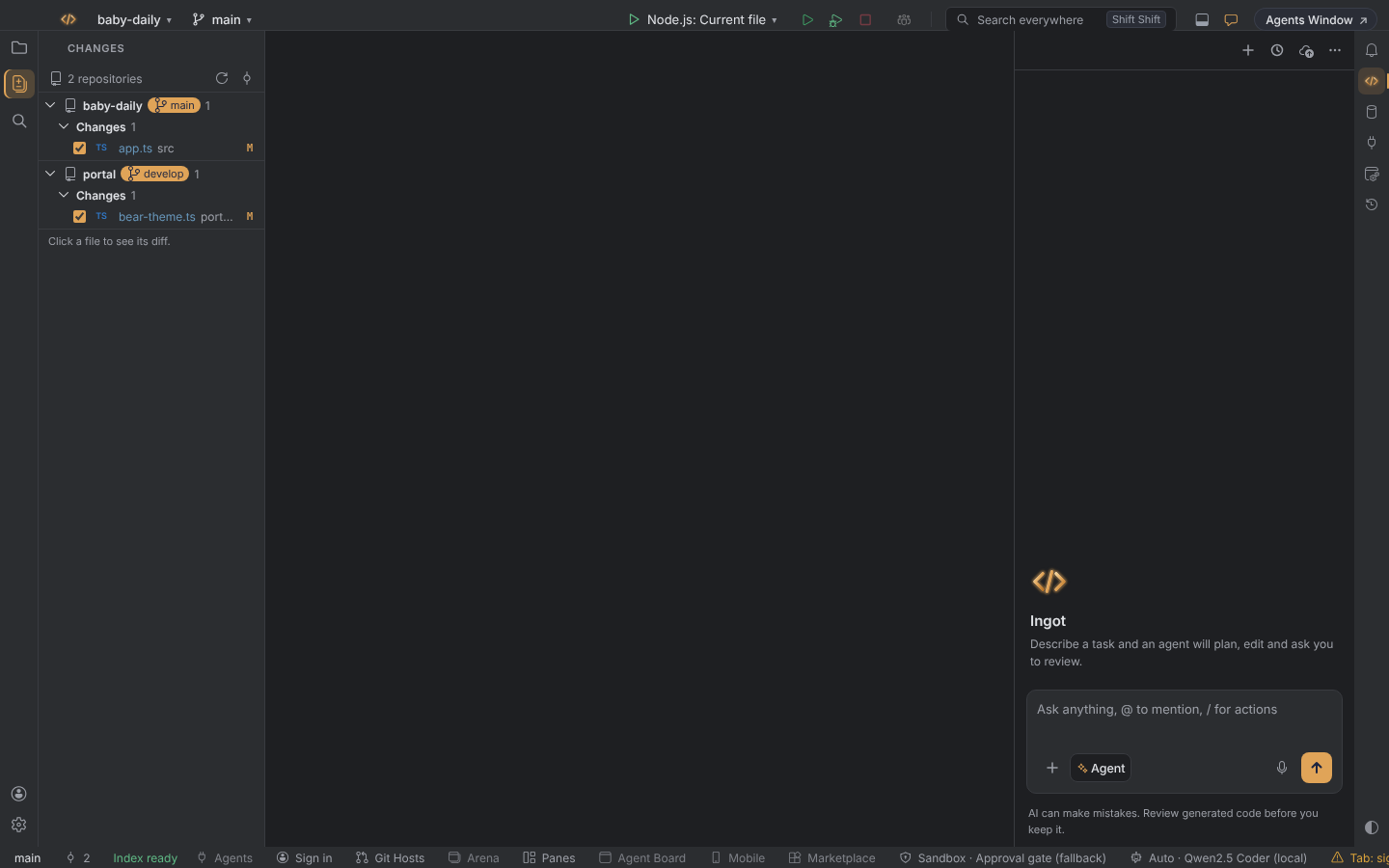
Choose where the list lives
| Value | What you get |
|---|---|
commitPanel (default) | The changed files are listed in the Commit panel, above the commit message. |
sidePanel | The changed files get their own Changes view in the side bar. The Commit panel keeps the message and the Commit buttons and links to the view. |
Set it in any of these places:
- Settings › Version Control › Changes location
- Settings › Features › Changes in a side panel
- the first-run setup (Help › Set Up Ingot…)
Git › Show Changes opens the list wherever it lives.
Work in the Changes view
| To | Do this |
|---|---|
| see a file's diff | click the file |
| include it in the next commit | tick its checkbox |
| roll it back, jump to source and more | right-click the file |
With several repositories, the view groups the files by repository and branch, the same as the Commit panel. See Changes from every repository.
Always up to date
The list follows every change without a reload, in both places, in the Commit window and in the Git window's Changes tab:
- Saved files show at once.
- Edits you have not saved yet are listed too. Commit saves all files first.
- Files changed outside Ingot (a terminal, an agent,
git checkout, another program) show within about a second, even while other files keep changing. Coming back to the window refreshes the list too. - New files in new folders are listed one by one (
feature/new.ts), not as the folder (feature/). - A project opened at a subfolder of a repository lists its changes with working diffs.
- The diff preview in the Commit window and the Git window follows the file while you edit it.
Files git ignores
Local Changes lists what git tracks, plus new files it doesn't ignore yet (under Unversioned Files). A file that matches a rule in .gitignore (build output, a generated config, .env) is never listed, even while you edit it. Ingot makes that visible so an empty list doesn't look broken:
- No change bars in the editor gutter for an ignored file. The gutter marks only what Local Changes can show.
- Ignored by git in the status bar while the file is open. Its tooltip names the rule, for example matched by
applications/*/gen-esbuild*.mjsin.gitignore. Click it to open that ignore file at the rule. - The file's tab title turns dim and italic.
- An empty Local Changes says No local changes.
gen-esbuild.browser.mjsis ignored by git. Click the file name to open the rule.
To commit the file after all, remove or narrow the rule (or run git add -f on it): it then shows in Local Changes like any other file.
Turn the indicator off with ingot.git.showIgnoredIndicator (Settings › Version Control or Settings › Features › Ignored by git indicator). Ignored files never get gutter change bars, whatever the setting.
Settings
| Setting | Values | Default |
|---|---|---|
ingot.git.changesLocation | commitPanel, sidePanel | commitPanel |
ingot.git.showIgnoredIndicator | true, false | true |
No new shortcut was added: the usual Commit (⌘0, Alt+0) and Git shortcuts stay as they are.