Arena mode
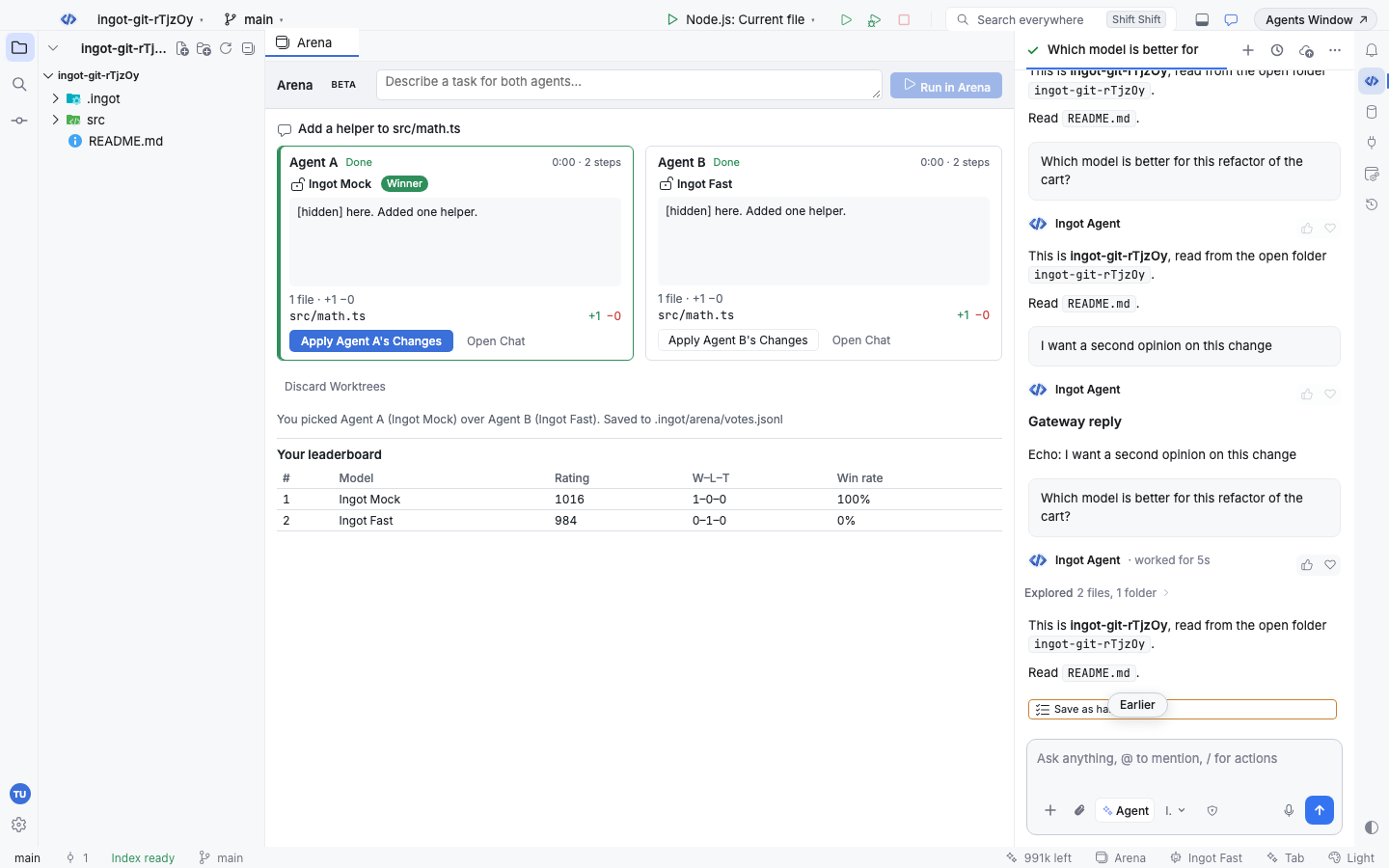
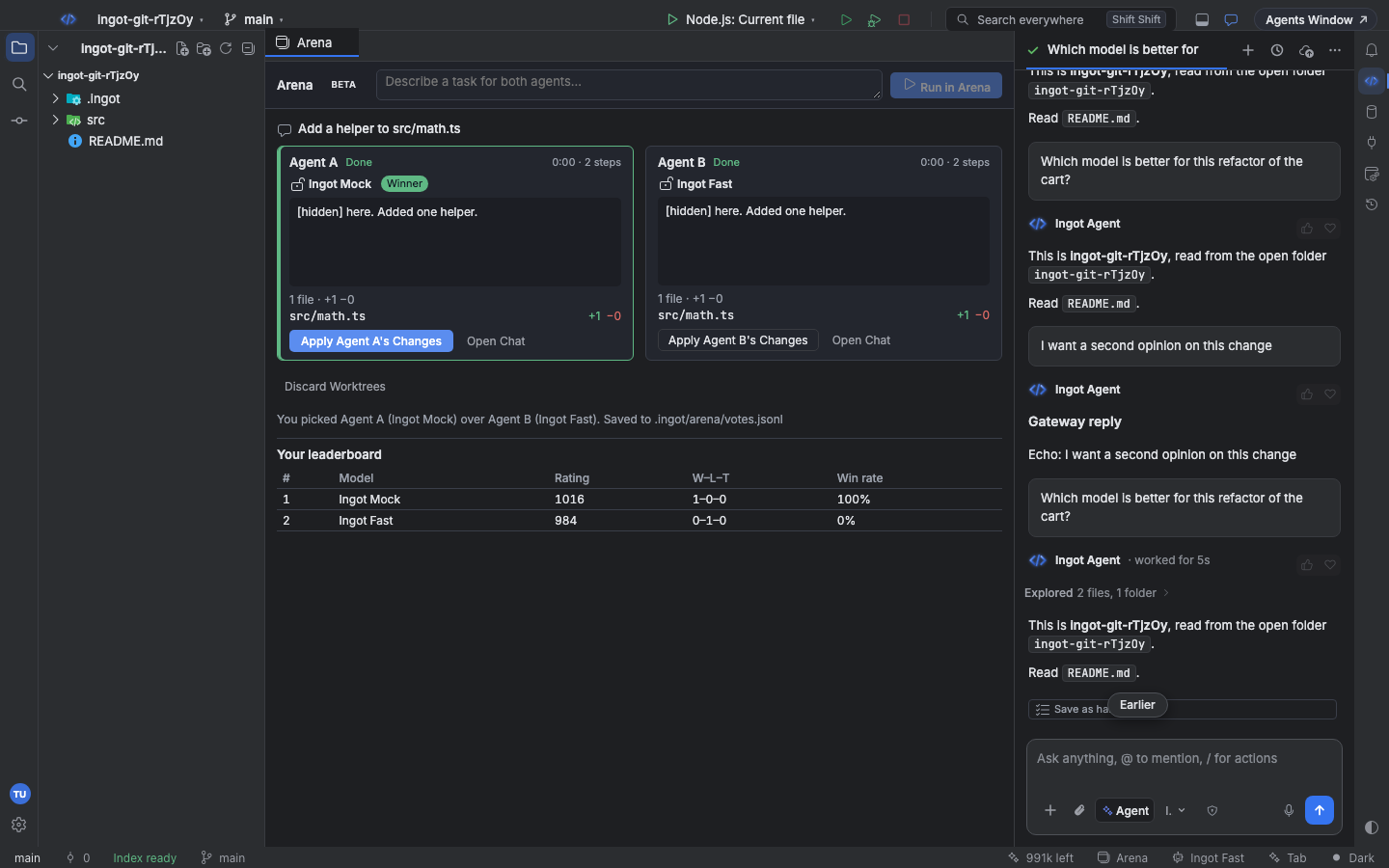
Arena mode runs one task with two agents whose models stay hidden, so you compare the results blind, vote for the better one and only then see which model was which.
Each agent works in its own git worktree, so neither touches your project. After the vote you can apply the winner's changes for review, and every vote goes into your own model leaderboard.
Run a battle
- Open Arena (⌘⌥⇧8 on macOS, Ctrl+Alt+Shift+8 on Windows and Linux) or click Arena in the status bar.
- Type the task and press Enter (or Run in Arena). You can also type
/arena <task>in the chat. - Ingot picks two different models at random and starts Agent A and Agent B. Each column shows the agent's answer, its steps, the time it took and the files it changed. The model shows as Model hidden until you vote.
- When both finish, vote: A is better, B is better, Tie or Both are bad.
- The models are revealed. Apply A's Changes (or B's) copies that agent's changes into your project as agent changes to review in the editor, then removes both worktrees. Discard Worktrees removes them without applying anything. Open Chat opens a contestant's chat as a normal tab.
Arena is off until you turn it on. Arena is a Beta feature.
Hidden models
- The two models are picked from Settings › Tools › Arena › Models to compare, or from every model that can run when that list is empty.
- Each agent is told not to name itself. Model and vendor names left in an answer show as
[hidden]until you vote. - The agents' chats are not tabs until the vote, and their worktree branches are named
ingot/arena-<id>-aand-b, so nothing gives the models away.
Worktrees
In a git repository each agent gets a fresh worktree from HEAD in a temporary folder outside the project. Your uncommitted changes to tracked files are copied into both, so the agents start from what you see. Your worktrees.json setup commands run in each worktree first, the same as for threads.
Outside a git repository, or with Run each agent in its own git worktree off, both agents answer in Ask mode and change no files.
Votes and the leaderboard
Every vote is one line in .ingot/arena/votes.jsonl in the project: the task, both models, how long each took, how many files each changed and your vote. Commit the file to share a team leaderboard.
The leaderboard under the battle ranks models with an Elo rating (start 1000, K 32): a win moves points from the loser to the winner, and a tie or Both are bad moves points toward the lower-rated model. Win rate counts a tie as half a win.
Find it
| Where | What it does |
|---|---|
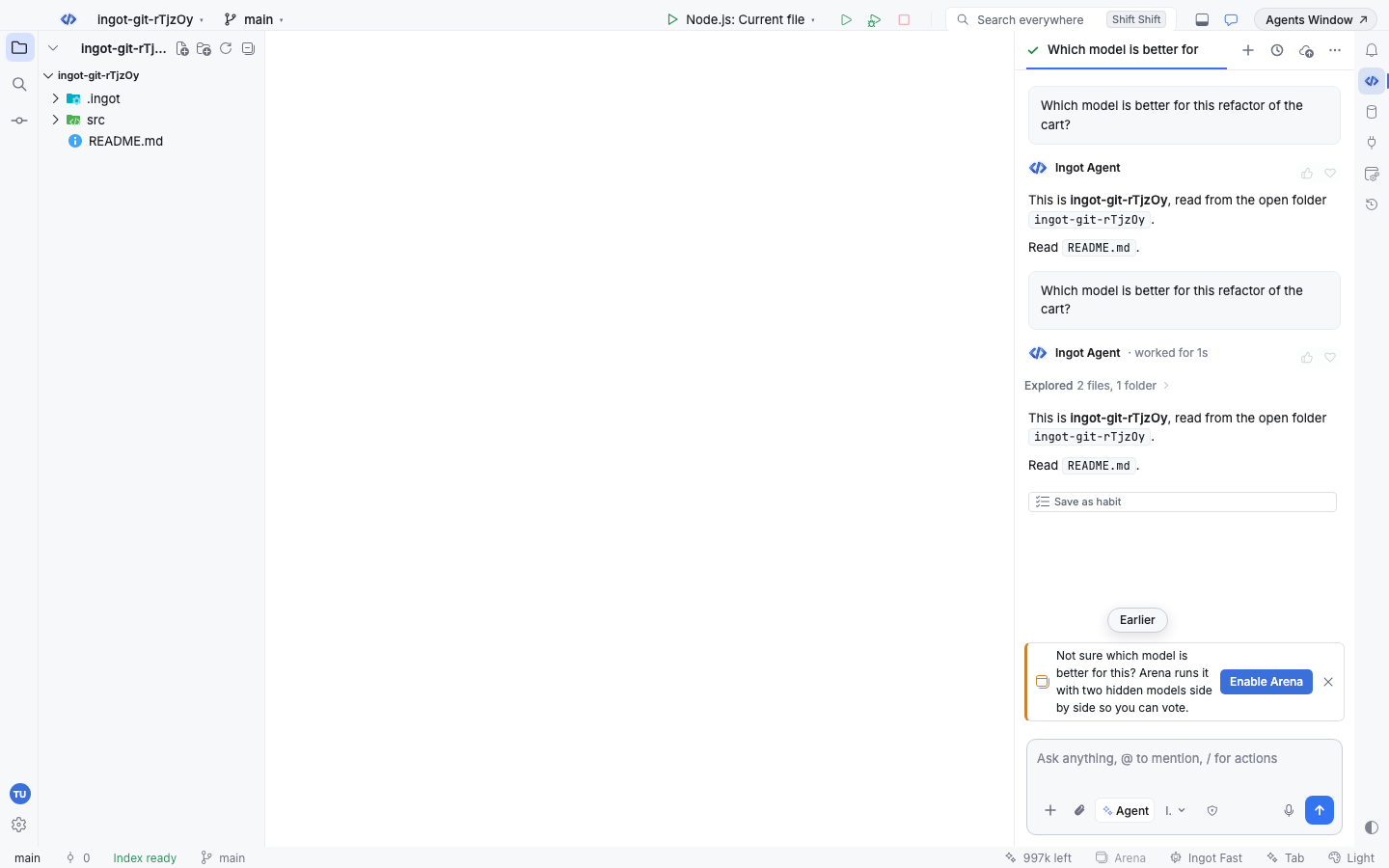
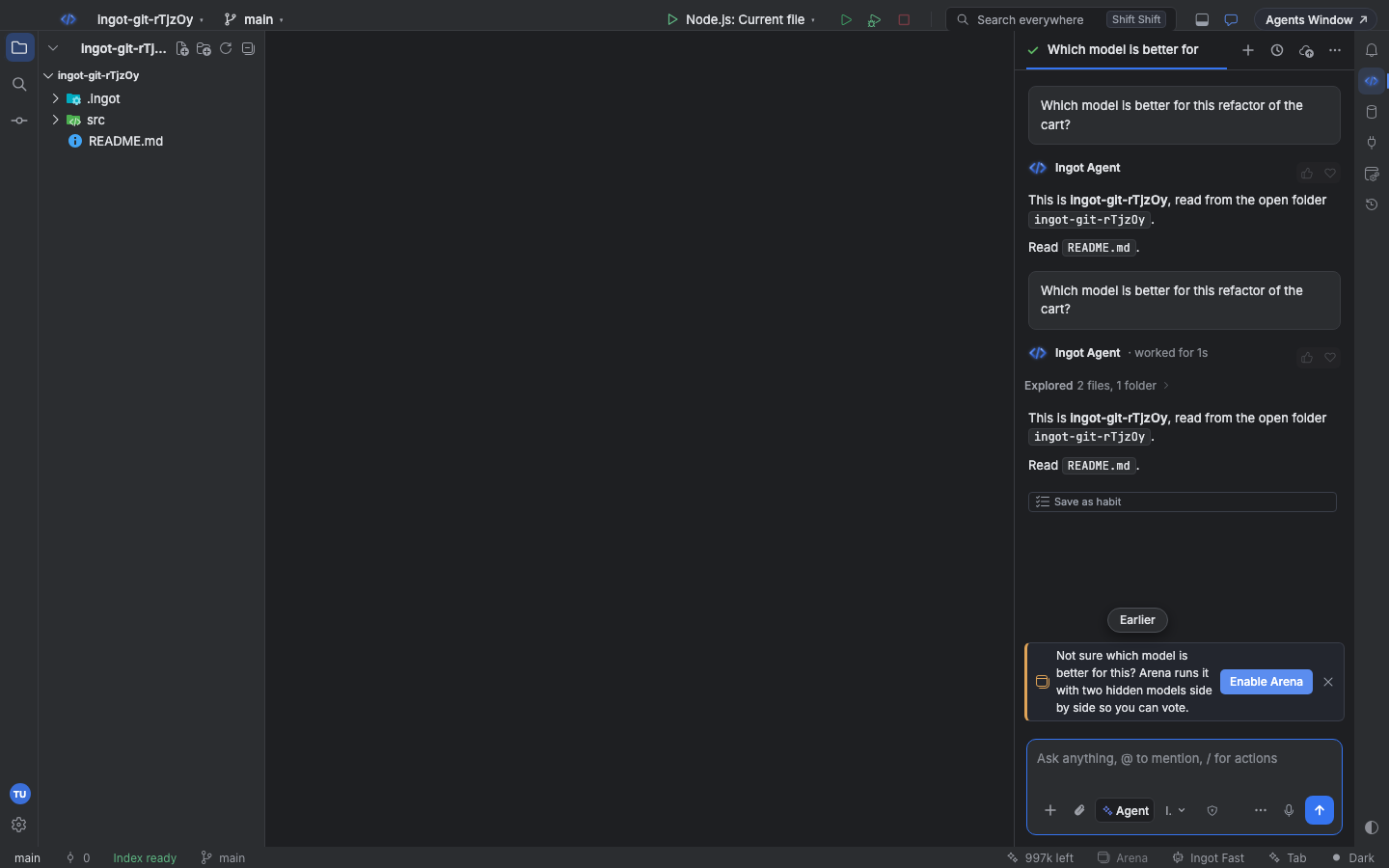
| A card above the chat box | When you ask which model is better, or want a second opinion, a small card suggests Arena. Enable Arena turns it on, opens it and puts your prompt in the task box. × hides the suggestion for good |
| Settings › Features | The Arena mode switch; the models to compare and the worktree setting are in Settings › Tools › Arena |
| Arena in the status bar | One click turns Arena on (if it is off) and opens it |
Turn every feature suggestion off with Suggest features in chat in Settings › Features; suggestions you closed are listed there. See Finding optional features.
Keyboard shortcuts
| Action | macOS | Windows / Linux |
|---|---|---|
| Open Arena | ⌘⌥⇧8 | Ctrl+Alt+Shift+8 |
| Run a Task in Arena… | ⌘⌥⇧7 | Ctrl+Alt+Shift+7 |
| Turn Arena On or Off | ⌘⌥⇧6 | Ctrl+Alt+Shift+6 |
| Stop Arena Agents | ⌘⌥⇧5 | Ctrl+Alt+Shift+5 |
| Vote: A Is Better / B Is Better / Tie / Both Are Bad | ⌘⌥1 / ⌘⌥2 / ⌘⌥3 / ⌘⌥4 | Ctrl+Alt+1 / 2 / 3 / 4 |
The vote shortcuts work while the Arena tab has focus and both agents have finished. Every action is also in Find Action.
Settings
| Setting | Default | What it does |
|---|---|---|
ingot.arena.enabled | false | Arena mode: the Arena tab, /arena and the status bar button open battles |
ingot.arena.models | [] | Model ids to pick the two from; empty means any two that can run |
ingot.arena.useWorktrees | true | Each agent in its own git worktree; off: answers only |
ingot.suggestions.enabled | true | Inline feature suggestions in the chat |
ingot.suggestions.dismissed | [] | Suggestions you closed with ×; remove one to see it again |
From the terminal
The ingot CLI runs quick text battles with a hard per-run cost cap and shares the same votes file:
npx @ingotide/cli arena run "Write a debounce helper in TypeScript"   # two hidden models answer
npx @ingotide/cli arena run "Explain this function" --with src/cart.ts --vote a
npx @ingotide/cli arena vote arena-mhj3k2ab-0a1b a                      # a, b, tie or bad
npx @ingotide/cli arena leaderboard                                     # Elo table from .ingot/arena/votes.jsonl
npx @ingotide/cli arena votes --limit 10
| Option | Default | What it does |
|---|---|---|
--models a,b,c | three cheap models | Pool to pick the two from |
--max-cost <usd> | 0.02 | Hard cap for the run (at most $1): the CLI stops before calling when the worst case is over it and exits 3 |
--max-tokens <n> | 800 | Answer length per model |
--with <files> | Project files sent as context (ignored files are skipped) | |
--vote <a|b|tie|bad> | Vote right away; without it you are asked, or vote later with arena vote | |
--mock | Canned answers, no network or key (also INGOT_ARENA_MOCK=1, for CI) |
run needs an OpenRouter key (OPENROUTER_API_KEY). Every option is on CLI.
Privacy and cost
- The IDE runs both agents with your own models and account, so a battle costs about two agent runs. Stop them any time with Stop.
- Votes stay in your project; nothing is sent to Ingot.
- Worktrees live in a temporary folder and are removed when you apply or discard.