Ingot Health
The Ingot Health panel shows what works in this window, and fixes what it can with one click. When something does not work, it is the first place to look, and its diagnostic report is the best thing to send us.
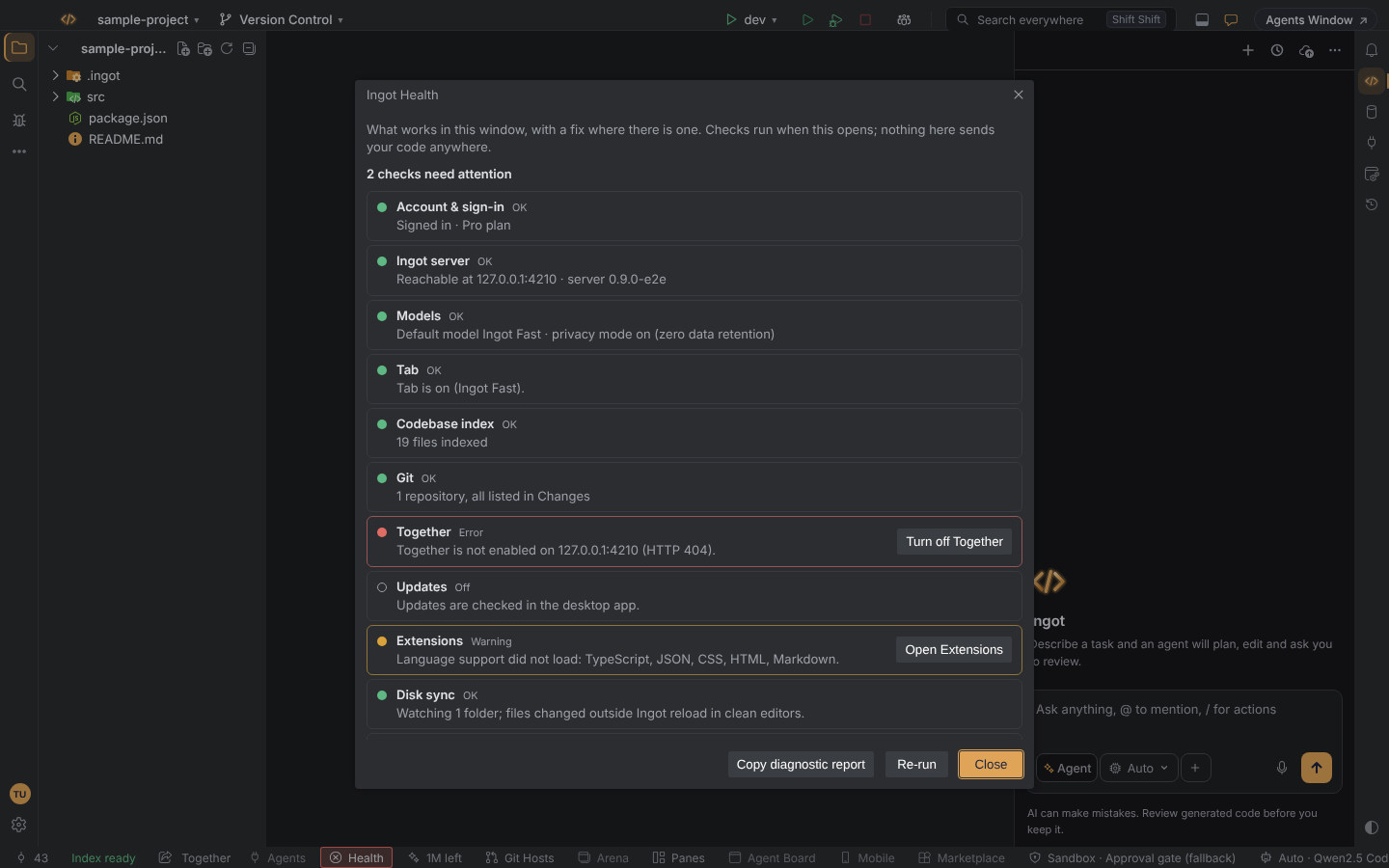
Open it
- Help › Ingot Health…
- Find Action (⌘⇧A, Ctrl+Shift+A), type Health
- the Health item in the status bar, while a check fails
What each row shows
Every row has a state, one line on what is going on, and a fix button where there is one.
| State | Meaning |
|---|---|
| OK | works |
| Warning | works partly, or needs your attention soon |
| Error | does not work |
| Off | does not apply here, or is turned off |
The checks
| Check | What it looks at | Fix |
|---|---|---|
| Account & sign-in | whether you are signed in, and on which plan | Sign in opens the sign-in when you are signed out |
| Ingot server | whether the Ingot server is reachable, and which version it runs | Retry checks again |
| Models | the default model, and whether privacy mode has a zero data retention route for it | Open Models opens the Models view to pick another model |
| Tab | the same reason as Why isn't Tab suggesting? | the fix that reason offers, for example Sign in or Install a local model… (Tab, Free local Tab) |
| Codebase index | ready, indexing or failed | Rebuild index indexes the project again (Codebase index) |
| Git | every repository in the folder, nested ones included, against what Changes lists | List them in Changes turns on nested repositories; Refresh Changes reloads the list (Changes from every repository). In a folder without a working repository it says the same as Local Changes: "No Git repository in this folder.", "Git can't read this repository…" or "Git isn't installed, or it isn't on your PATH."; when Git is missing the row is an error with Install Git…, which opens git-scm.com (Folders without Git) |
| Project setup | which .ingot rules, skills, commands and habits were loaded for the open folder, how its layout was read and why something was skipped (details below) | Turn on Habits when the project has habits but Habits is off; Turn on when the row is off |
| Project layout | whether .ingot runtime files stay out of git, and the test layout agents follow | Fix ignores adds the missing patterns; Turn on when the feature is off (Project layout) |
| Together | while Together is on: whether its server accepts your Ingot sign-in, or "not enabled on the server" | Turn off Together (Ingot Together) |
| Updates | the desktop app's update channel and its last check. In the browser the row is Off: updates come with the desktop app. | (Release channels) |
| Extensions | the extensions loaded, and the language support Ingot ships (TypeScript, JSON, CSS, HTML, Markdown) | Open Extensions (Language support) |
| Extension guards | whether the Extension guard and the Window chrome guard are on, and whether they keep any extension from starting | Turn on when a guard is off; Show them when extensions are kept from starting |
| Languages & toolchains | whether this project's files are missing a language server or a runtime | (Languages) |
| Disk sync | whether the file watcher works, so edits made outside Ingot show up | Reload changed files reads the changed files from disk again |
| MCP servers | connected, waiting for a key, or failed | Open MCP servers opens the MCP tool window (MCP servers) |
Project setup
The Project setup row answers "why doesn't the agent follow my rule?" without guessing. Its line says how many rules, skills, commands and habits were loaded and how the project is laid out, for example "4 rules, 1 skill, 3 commands, 1 habit loaded. React Native (Expo), Expo Router project; code in the project root, app/, components/, hooks/." Click Details to see:
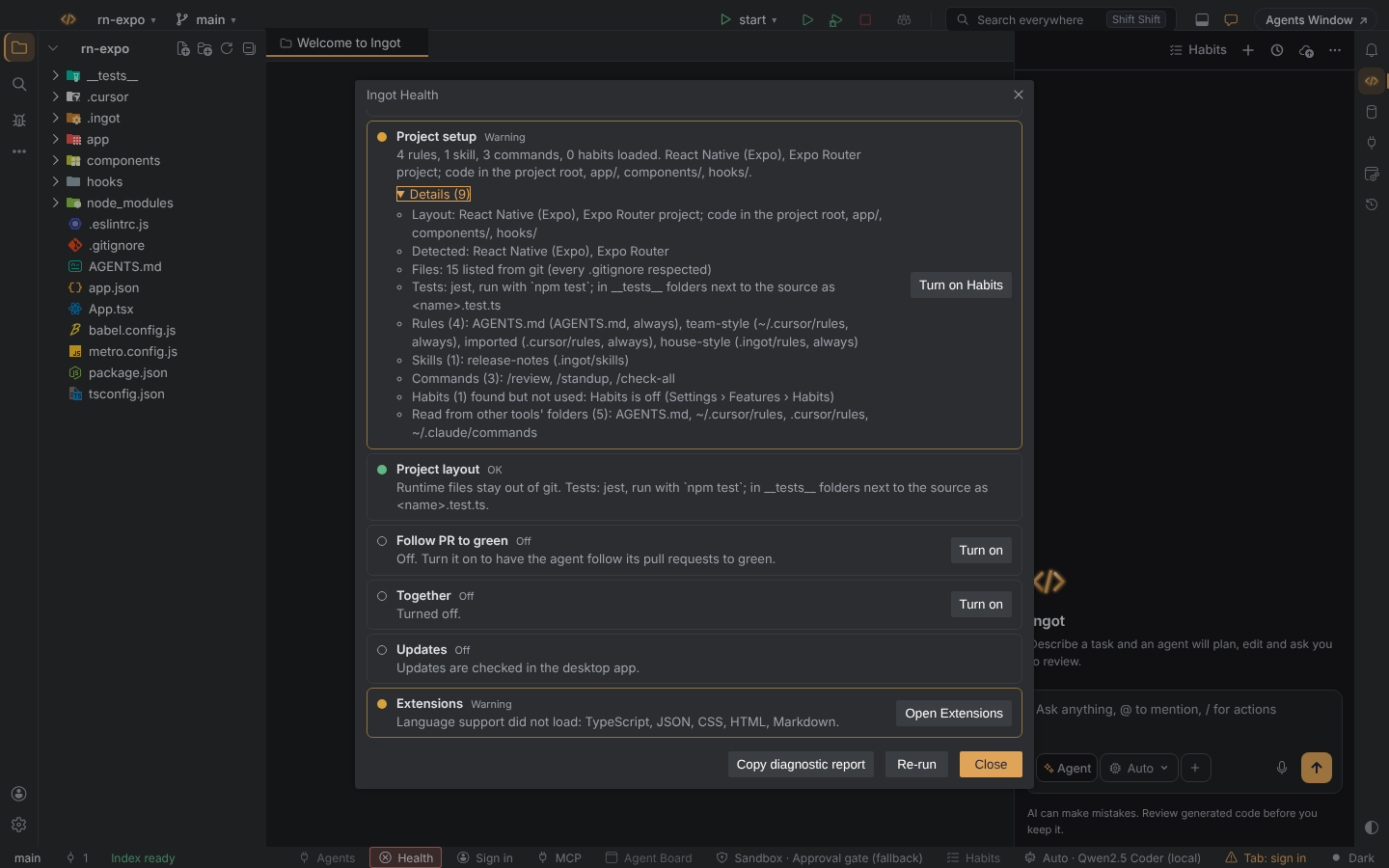
- Layout: a monorepo with its packages, or the kind of project (React Native, Next.js, Python package, Go module, Gradle, Rust crate…), and the folders that hold the code. No
srcfolder is needed. - Files: whether the list came from git or a walk of the folder, how many files, folders left out (dependencies such as committed
Pods) and, in a large project, that the map reads a balanced sample of every folder. - Tests: the framework and command agents run, and where tests go.
- Rules, Skills, Commands and Habits: each one with the folder it came from (
.ingot/rules,.cursor/rules,AGENTS.md,../.ingot/rulesfor the folders above,~/.cursor/rules…). - Why something was skipped: habits found while Habits is off (the row is a warning with Turn on Habits), habit files that didn't load,
.cursornot read because of this project's import answer, a.ingotfolder with nothing Ingot can read, or the limit of rule files in subfolders.
Turn the row off with Settings › Features › Project setup check (ingot.health.projectSetup, on by default).
When the checks run
- when the panel opens, and when you click Re-run
- once, quietly, a few seconds after start-up
Each check makes at most one request and gives up after 3 seconds, so the panel never hangs on a slow server. Nothing in the panel sends your code anywhere.
The Health item in the status bar
While a check fails, a Health item shows in the status bar: red for an error, amber for a warning. Click it to open the panel. It goes away once every check passes.
| Setting | Default | Effect |
|---|---|---|
ingot.health.statusIndicator | true | show the Health item while a check fails |
You can also turn it off with Health indicator in Settings › Features or in the first-run setup (Help › Set Up Ingot…).
Copy diagnostic report
Copy diagnostic report copies a Markdown report to the clipboard with:
- the Ingot version and edition (desktop or browser) and your operating system
- every check, with its state and message
- the settings that matter for those checks
These are never included: email addresses, tokens and keys, credentials and query strings in URLs, home folder names, and file contents. Read the report before you send it; it is plain text.
Paste it into a GitHub issue or a message to support when something does not work.
See also Troubleshooting.